
2020 - Wow. Here we are, in a decade we couldn’t have imagined back in high school but, thanks to television, had visions of flying cars, robots, and time travel in a DeLoreon. We’ve sort of gotten 2 out of 3 with self-driving cars and Roomba vacuum cleaners (wish I had invented that one). I won’t be holding my breath on the time travel, despite social media’s efforts to remind me what I did last summer. And now, let’s travel back to the topic at hand which is improving your small business website in 2020.
I’ve had the luxury of working with scores of varying types of business over the years. I’ve helped countless small psychotherapy practices, chiropractors, small furniture stores, bed and breakfast inns and many nonprofit organizations. There are some things that cross all lines of business, so here’s my attempt to cover most everyone with a few quick recommendations to help you improve your small business website in 2020.
1. Double check all those things you should’ve done in 2019 such as:
2. ADA accessibility is becoming increasingly important for websites. There are a variety of standards for judging websites but if you’re a small business, you could simply add a widget or plugin to your site (for free) and that will help you become compliant on a basic level. Take a look in the lower right hand corner of my website, debbielamb.com and you’ll see a free tool called UserWay that is easy to add to sites and also provides a free accessibility statement template you can add to your site. You may not realize your website could give some people seizures do to your creative colors or animations and this app could seriously help those with disabilities. To check your website’s web accessibility, you can use webaccessibility.com, a free and easy tool that will even give your website a score and show you where you can improve.
I’ve had the luxury of working with scores of varying types of business over the years. I’ve helped countless small psychotherapy practices, chiropractors, small furniture stores, bed and breakfast inns and many nonprofit organizations. There are some things that cross all lines of business, so here’s my attempt to cover most everyone with a few quick recommendations to help you improve your small business website in 2020.
1. Double check all those things you should’ve done in 2019 such as:
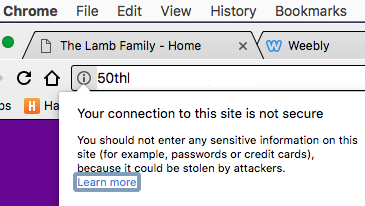
- Make sure your website’s address or url begins with https and not http. I’ve talked to several small business owners who thought their website was secured with an SSL certificate only to learn that it was never enabled. Without a secure website, Google has probably lowered your search engine ranking and lots of visitors may have arrived on your site only to be greeting with a scary security warning.
- Take a look at your website on your cell phone and your tablet device and make sure it looks decent. Your website should be responsive which means it should respond to the size of any screen. Another way to check your website’s responsive design is to simply shrink the size of your browser on any computer and watch as your site adjusts accordingly. If you shrink the size of your browser and your site doesn’t adjust the look & feel, then you do not have a responsive site. This is also problematic when it comes to your search engine rankings.
2. ADA accessibility is becoming increasingly important for websites. There are a variety of standards for judging websites but if you’re a small business, you could simply add a widget or plugin to your site (for free) and that will help you become compliant on a basic level. Take a look in the lower right hand corner of my website, debbielamb.com and you’ll see a free tool called UserWay that is easy to add to sites and also provides a free accessibility statement template you can add to your site. You may not realize your website could give some people seizures do to your creative colors or animations and this app could seriously help those with disabilities. To check your website’s web accessibility, you can use webaccessibility.com, a free and easy tool that will even give your website a score and show you where you can improve.
 RSS Feed